Google is turning Gmail into a much smarter inbox assistant. Gemini is now baked deeper into search, proofreading, and even how your inbox itself is organized.
Announced January 8, 2026, the new wave of features starts rolling out to paying users today, while some of last year’s premium tools move down to the free tier.
AI Overviews come to Gmail search
AI Overviews showed up in Gmail last year to summarize long email threads. Now Google is pushing the same idea into one of Gmail’s oldest core features: search.
Instead of just getting a list of matching messages, you’ll be able to type natural language questions into the search box – things like:
- "What was the plumber’s quote from last spring?"
- "When is my next flight to New York?"
Gemini then scans your inbox and generates a structured answer that pulls out the key details and links directly to the source emails. Think of it as the AI Overviews experience from Google Search, but scoped only to your personal mail.
That limitation might matter. AI Overviews on the public web have a reputation for being flaky when they try to summarize the entire internet. Grounding the model in your own messages should, in theory, cut down on hallucinations and vague answers — though Google isn’t promising perfection.
At launch, AI Overviews in Gmail search are reserved for AI Pro and Ultra subscribers.
Gemini-powered proofreading for Gmail
If you pay for Gemini, Gmail is also turning into a more proactive editor.
AI Pro and Ultra subscribers will see a new proofreading layer on top of standard spellcheck. Suggestions appear as dotted underlines in your draft, and Gemini can recommend clearer wording, tighter sentences, and more polished phrasing.
Google says this ‘AI Proofreading’ relies on its largest Gemini 3 models, which can handle more nuanced edits than the basic spelling and grammar tools built into Gmail today.
The idea is to keep the workflow lightweight: you write as usual, Gmail quietly flags spots that could be improved, and you choose which changes to accept.
An experimental AI-organized inbox
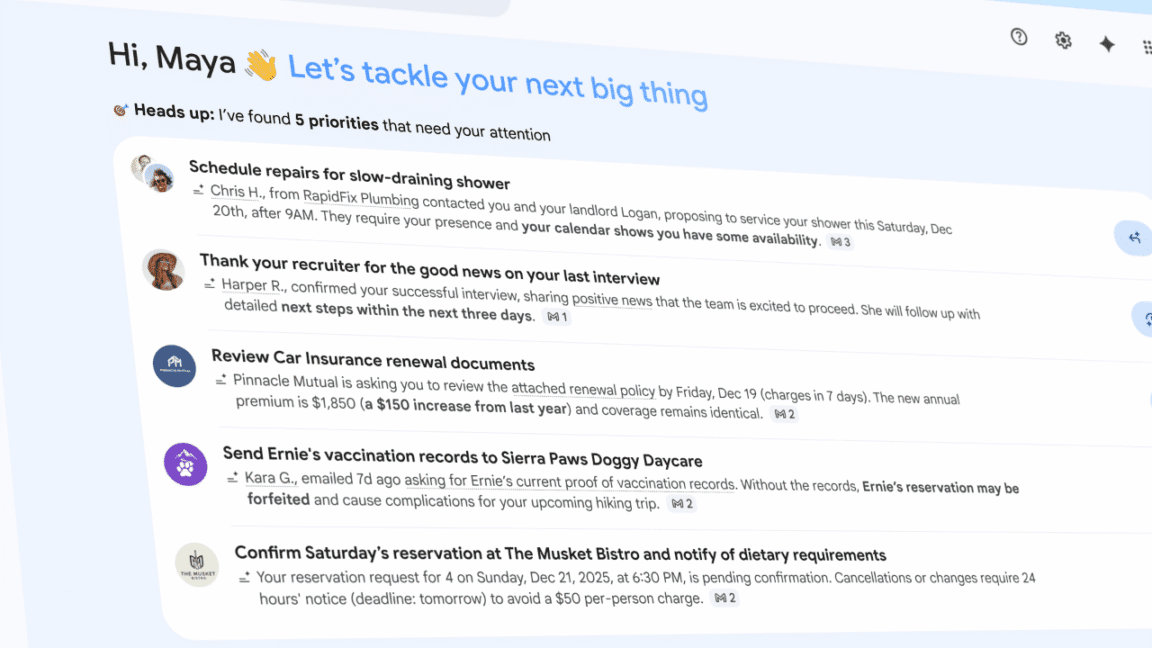
The most radical change is something Google is simply calling AI Inbox.
This isn’t a reboot of the old Google Inbox app, but a new way of viewing your existing Gmail. Instead of the usual list of unread messages, AI Inbox builds an interactive overview driven by Gemini.
The test interface is split into two main areas:
- Priorities – A list of individual emails Gemini thinks are genuinely important. Each one is pulled out as its own line item at the top.
- Catch me up – A set of summaries for everything else, designed to help you skim less critical mail without opening every message.
Behind the scenes, Gemini is constantly deciding what’s important and what isn’t, then either surfacing it as a priority or rolling it into a summary.
Google says AI Inbox will be strictly optional when it launches more broadly. For now, it’s headed to a small pool of ‘trusted testers’, with no public timeline for a wider rollout. Still, it’s easy to imagine Google nudging more people toward this view if the early data looks good.
Premium AI features are leaking into the free tier
Alongside the new tools, Google is quietly changing who gets access to Gemini inside Gmail.
Last year’s AI additions — email summaries, Help me write, and Suggested replies — originally lived behind AI Pro and Ultra subscriptions. According to Google, most Gmail users never paid for those plans.
That’s starting to change. Those three features are now rolling out to the free version of Gmail, dramatically increasing the number of people who will see Gemini-style assistance while they write and respond.
Expect a similar pattern here: Proofread, Search AI Overviews, and likely AI Inbox will debut as paid perks, then trickle down over time. If you were hoping AI in email would stay confined to premium tiers, that window is closing fast.
You can turn it off – but there’s a catch
Google says the answer to "Can I disable this?" is still yes. But the switch is getting blunter.
There’s no dedicated toggle just for Gemini. Instead, AI features are bundled under Gmail’s existing Smart features setting. Turn that off and you shut down Gemini in your inbox — but you also lose a pile of convenience features, including:
- Package tracking cards
- Calendar integration inside Gmail
- Loyalty and other cards in Google Wallet that depend on email parsing
If you’re comfortable giving up those extras, you can keep Gemini out of your inbox entirely. If not, the future of Gmail is going to look a lot more like an AI-first productivity app and less like the classic email client that launched more than 20 years ago.


